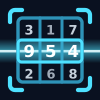
Scanning a board
Open Scan from the home screen and point your camera at the puzzle. There is no shutter button — Puzzlesight looks for a grid continuously and locks on the moment it finds one. The corner brackets turn solid when the board is framed well.
For the cleanest read:
- Keep one board in view. If two grids are visible, Puzzlesight asks you to move in closer so it knows which one you mean.
- Fill most of the frame. If the grid is small and far away, move nearer until the reticle brackets snap in.
- Angles are fine. A photo taken from the side is corrected automatically, but straight-on gives the sharpest digits.
- Avoid glare. Tilt away from a lamp or window reflecting off glossy paper.
Printed digits vs. your handwriting
Puzzlesight tells the puzzle's printed givens apart from digits you have filled in yourself, whether in pen or pencil. Printed numbers become the locked clues; your entries stay editable, so importing a half-finished board keeps your progress instead of overwriting it.
Crossed-out numbers and rough working are treated as scribbles and left out of the grid. If a cell is read wrong, tap it after importing to correct the value by hand.
Solving, checking, and learning
Once a board is on screen you have three ways to use it:
- Solve reveals the complete, verified solution.
- Check marks only the cells you ask about, so you can confirm a single answer without spoiling the rest.
- Learn walks through the next logical move and explains why it works, one step at a time.
Every scanned puzzle is kept in your Library, so you can leave a board and jump straight back into it later from the home screen.
Printing your own sheets
Open Print to generate fresh boards to solve with a pencil. Pick a difficulty, choose how many puzzles fit a page (one, two, four, or six), and decide whether to include an answer key.
Tap Export to create a PDF or image and send it through the share sheet. If your printer is not on Wi-Fi, email the file to yourself and print it from any computer.
Troubleshooting
The grid will not lock on
Move closer so the board fills the frame, steady your hand, and make sure the whole grid — all four edges — is visible.
A digit came in wrong
Tap the cell after importing and type the correct value. Faint pencil marks and unusual handwriting are the usual culprits; better lighting helps.
It imported the wrong board
When more than one puzzle is on the page, Puzzlesight waits until only one is framed. Move in until a single grid fills the view.
Still stuck?
Email [email protected] or visit Support and we will help.